Live log monitoring for macOS
Death by a thousand terminal tabs.
LogRaker puts every server, every cloud, and every log in a single native Mac app. Live, and always connected.
SSH · Local files · Amazon CloudWatch · Amazon S3 · Supabase · Google Cloud / Firebase

14-day free trial · macOS 15 (Sequoia) and up.
Version 2.5 (build 194) · Released September 20, 2026
Watching logs is something you do every single day. Why does it still feel like 1999?
Meet LogRaker
A real Mac app that gives every log a permanent home.
Define your sources once. LogRaker owns all the ugly plumbing forever after: the SSH transport, the reconnection logic, the file watching, the host-key trust, the timestamp wrangling. A clean two-pane window, your sources on the left, live output on the right. And you just watch.
It looks like it belongs on your Mac because it does: Dark Mode, accent colors, translucent sidebar, real keyboard shortcuts, Dock badges, native notifications. The works.
Headless Mac minis
The Mac minis in the closet, watched from your desk.
More and more Mac minis run local AI servers with no monitor attached. LogRaker runs on the Mac you sit at and follows their logs over SSH, so nothing is installed on them and they stay headless.
- Ollama, LM Studio, launchd. Tail
~/.ollama/logs/server.log, LM Studio's server logs and whatever your launchd jobs write, each its own stream, side by side in one layout. - Know when a model falls over. A Monitor watches every stream for 'error', 'out of memory' or a job that exited, and tells you.
- On the TV in the room. A Dashboard of every mini's streams on Apple TV, live.
- Ask an agent. The AI agent on your desk Mac reads their logs through LogRaker's MCP server: "why did the 70B model unload?"
Features
Read logs like it's 2026.
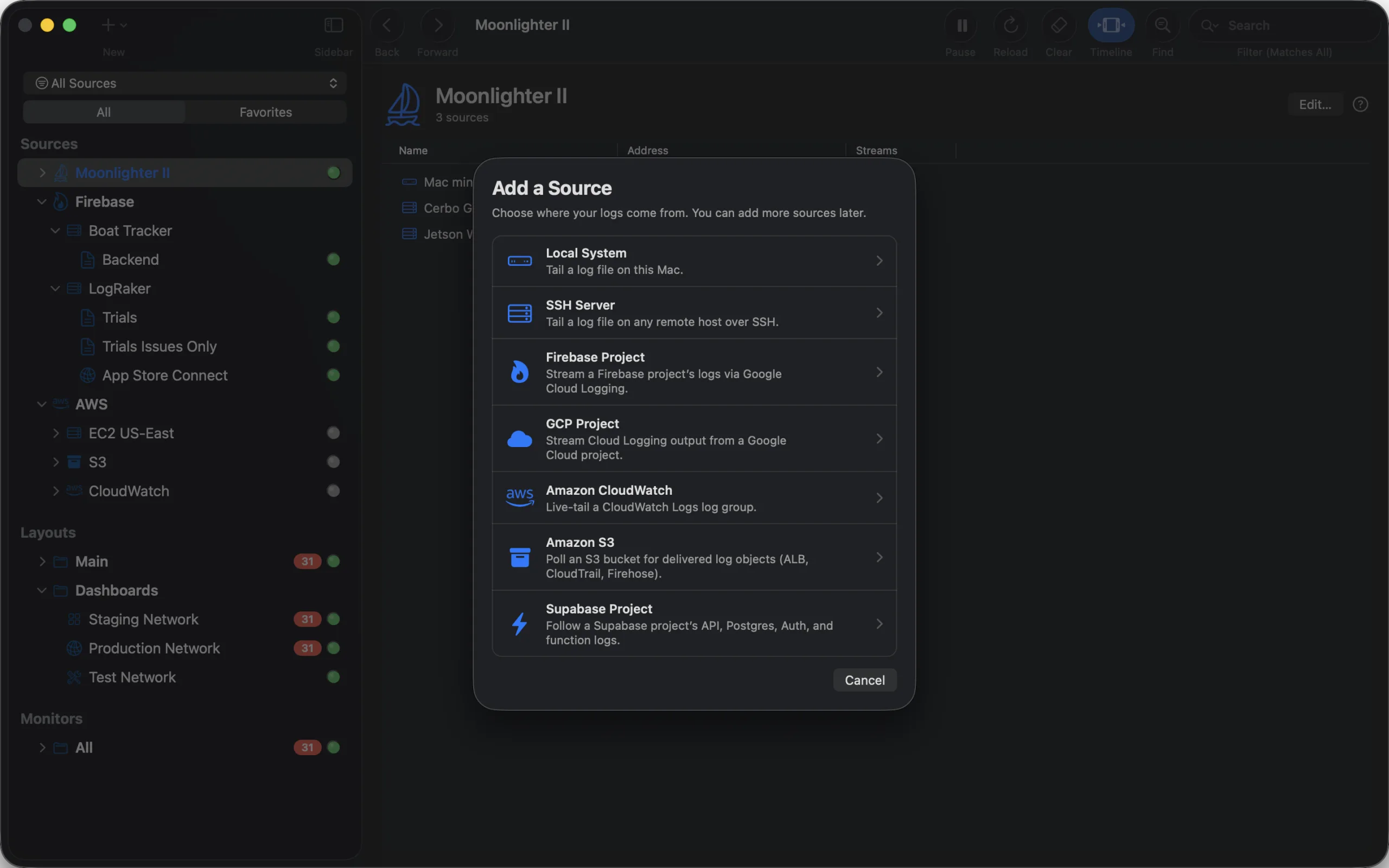
Everything you tail, in one app.
SSH hosts, local files, Firebase and Google Cloud, CloudWatch, S3 buckets, Supabase. Pick a source, point it at a log, done.
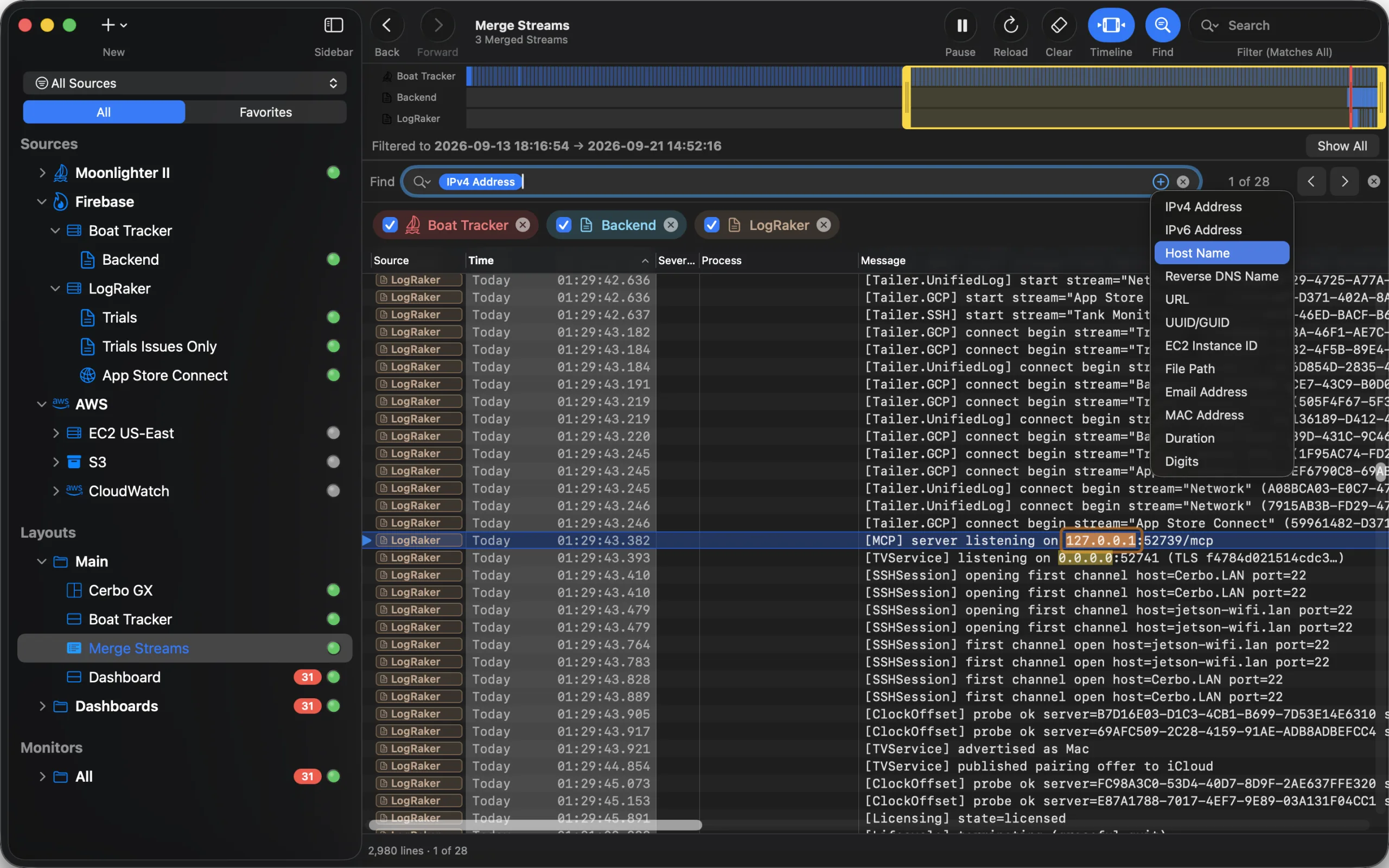
Find what you can’t spell.
Insert an IPv4 address, a URL, a UUID, an EC2 instance id or a file path as a token, and Find catches every one of them.
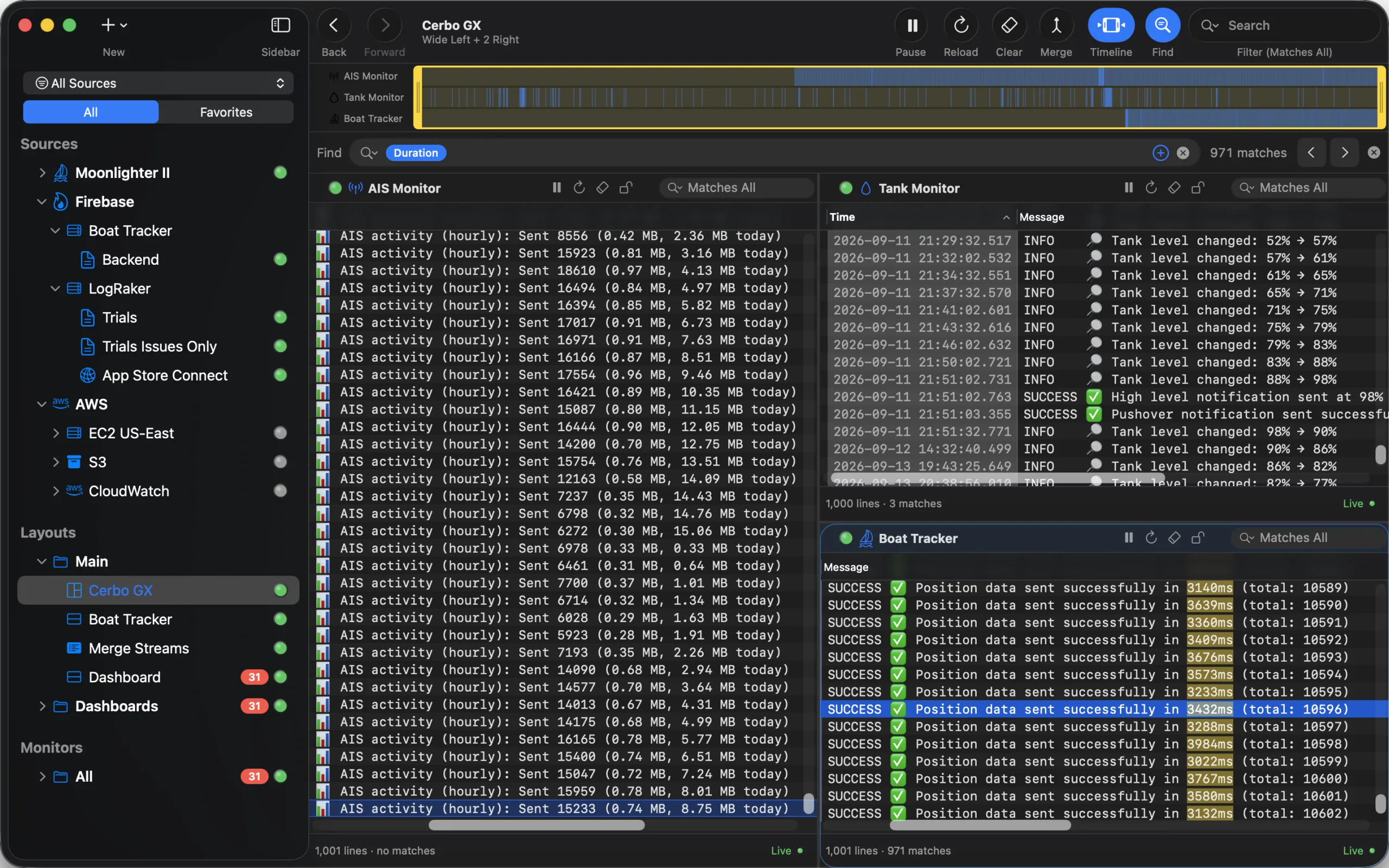
A wall of logs.
Splits and grids up to 3×3. Drag streams into slots, name it, saved forever.
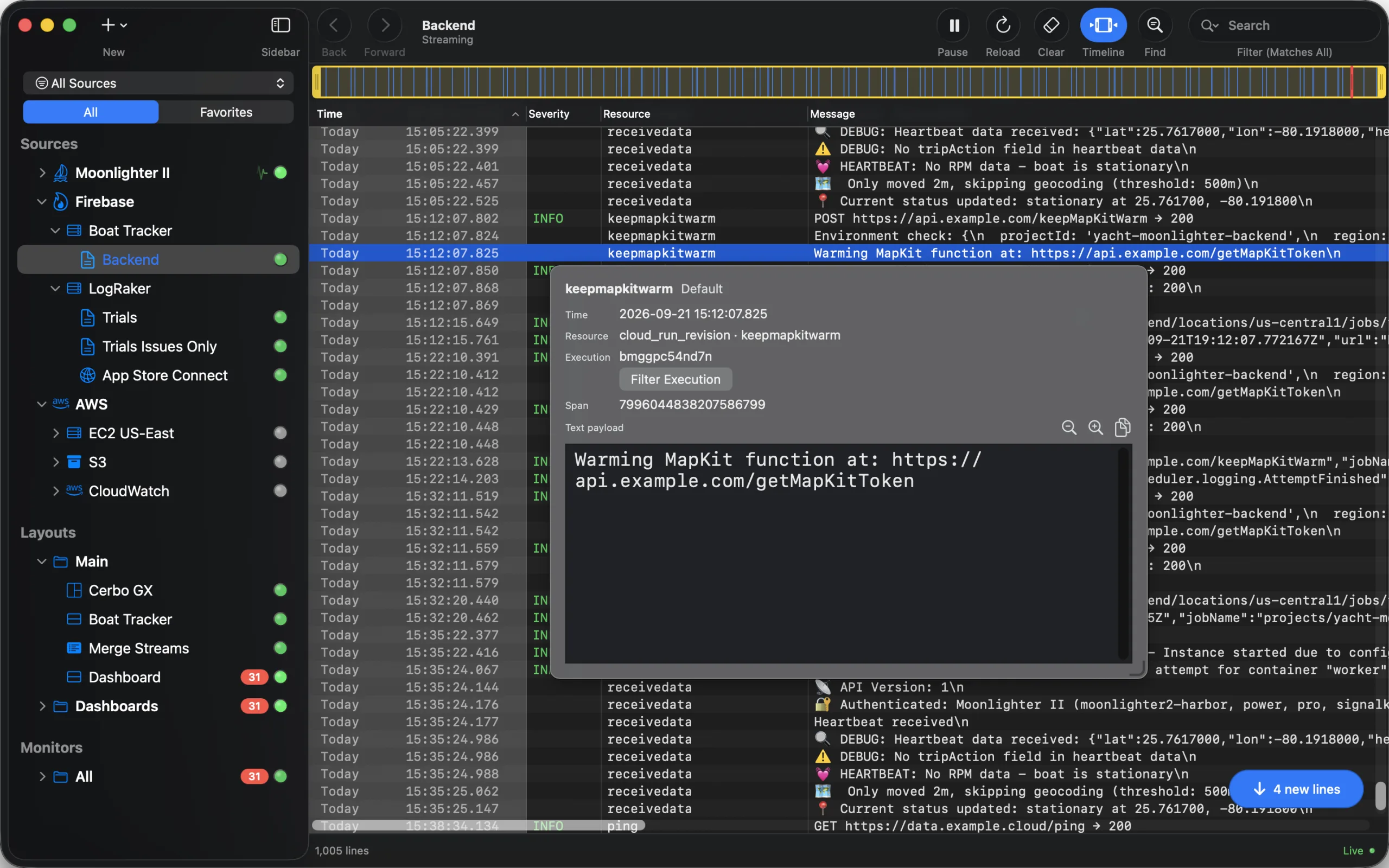
An inspector for every line.
‘Inspect Entry’ lays out what a line carries: resource, execution, span, the raw payload. One click filters the view to that execution.
Real columns. Errors to the top.
Time, Severity, Host, Process, Message. Resize, reorder, hide, sort. Click 'Severity' to gather the errors, 'Back to Time Order' to return to the tail.
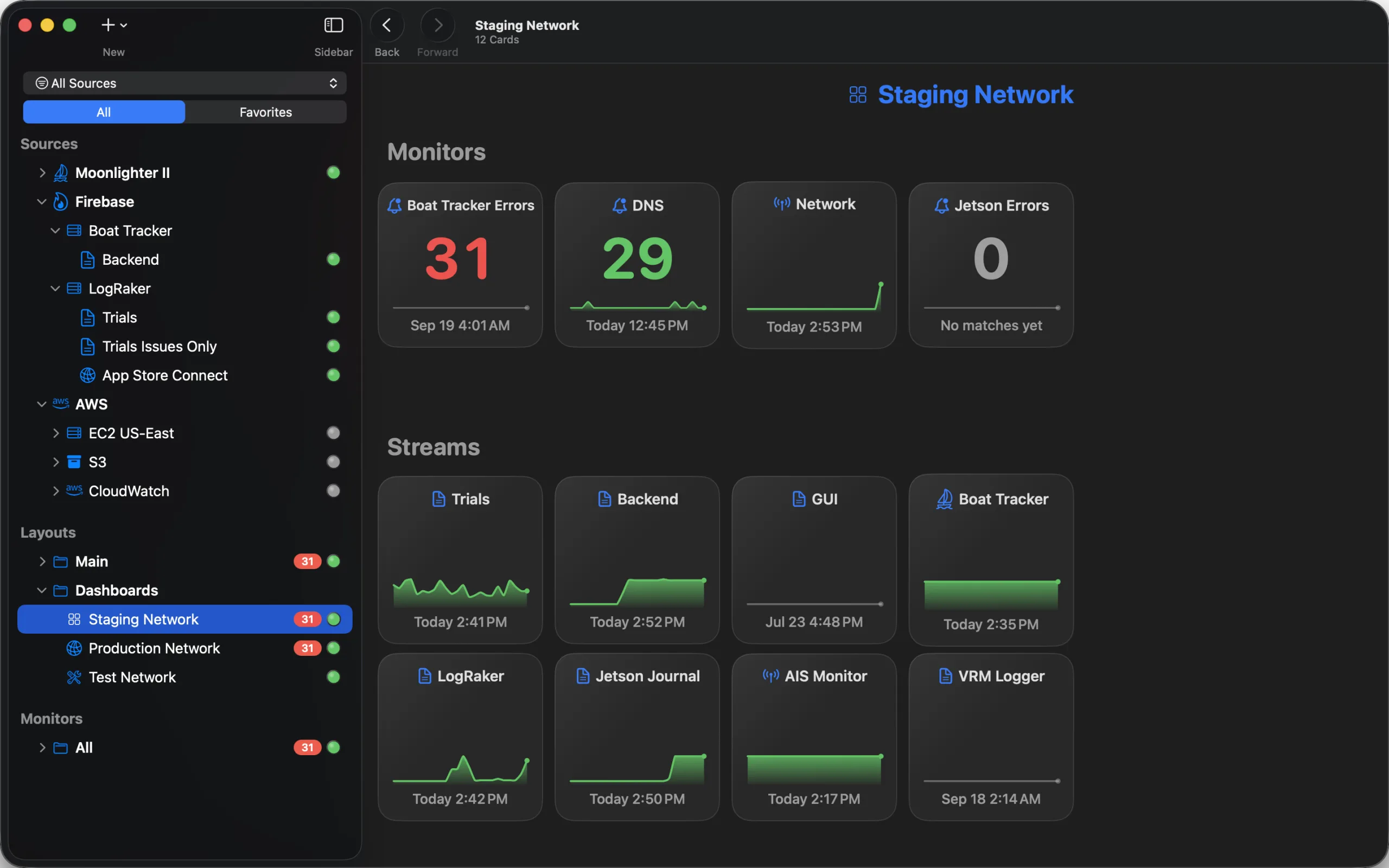
A dashboard of everything.
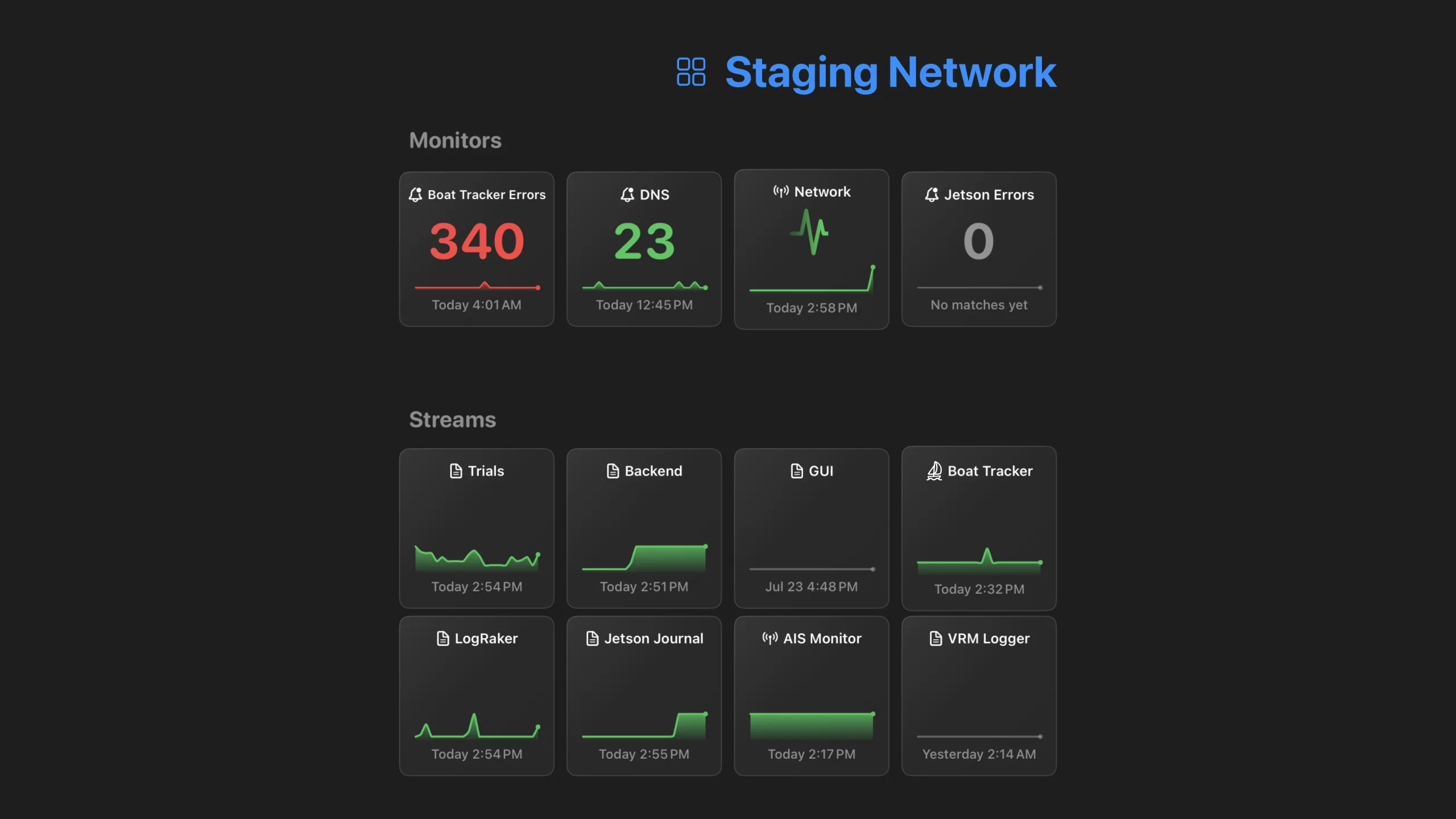
Monitors and streams as live cards with sparklines. The whole fleet on one screen.
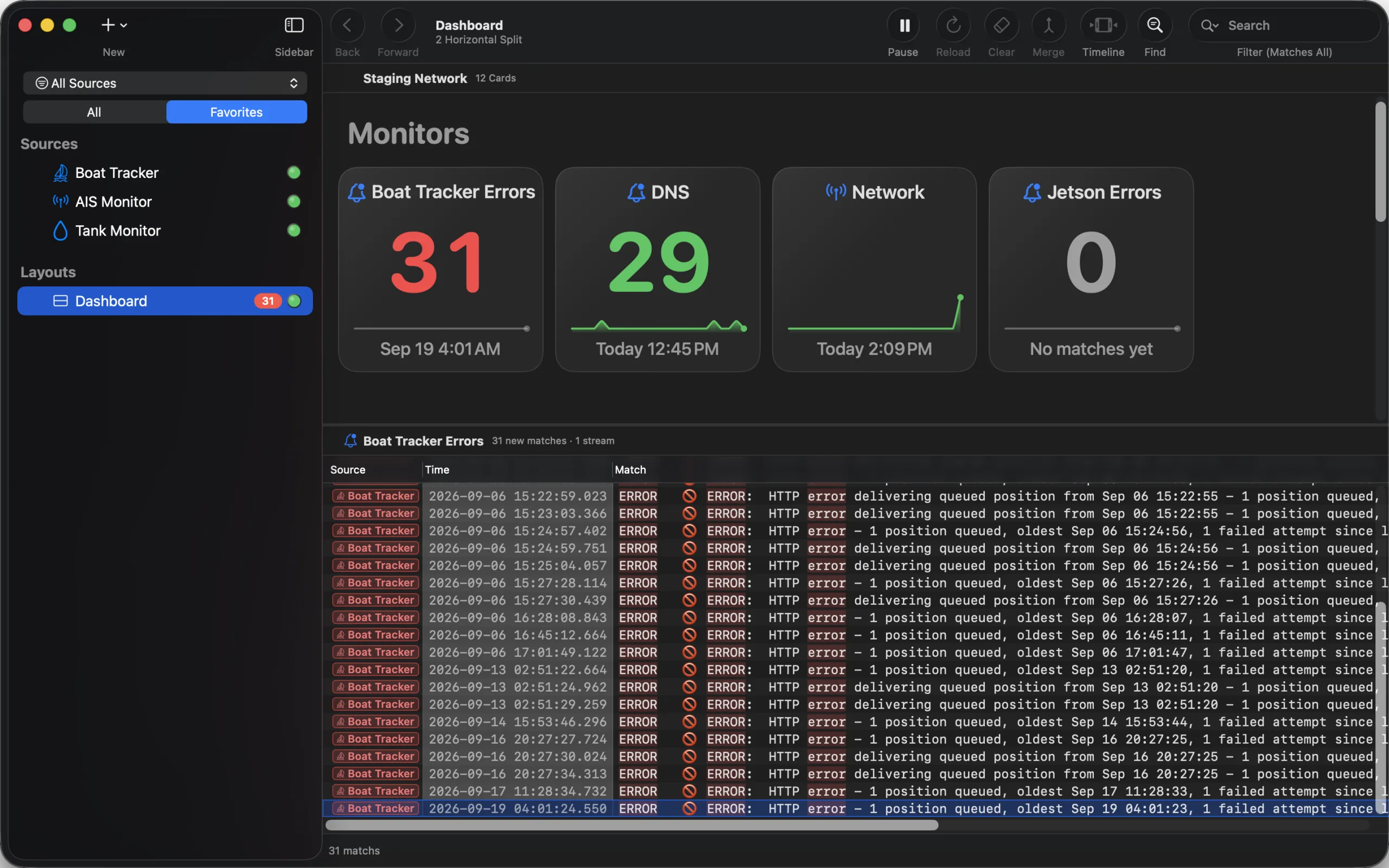
Monitors, and the lines that tripped them.
Watch every source for your patterns, then read the matches themselves: native notifications, a screen flash, a Dock badge and desktop widgets carry the count.
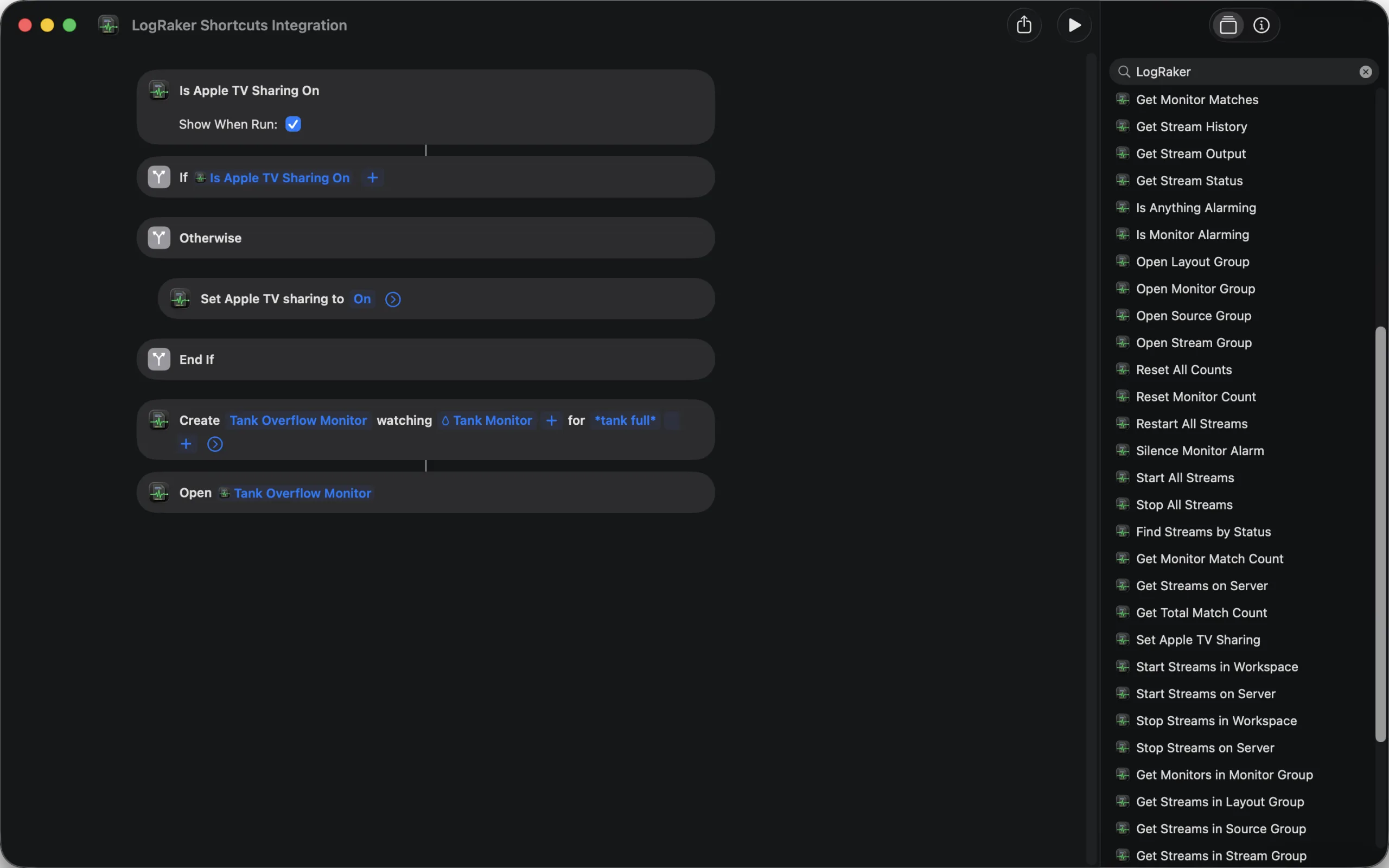
Automate it.
Thirty-odd Shortcuts actions: start a stream, create a Monitor, open it, ask whether anything is alarming.
SSH that will not quit.
In-process SSH with dual-layer keepalives, smart backoff, one multiplexed connection per server, and real host-key trust.
How it stays connected →Align disagreeing clocks.
Set a reference time on a line you trust, align the matching line elsewhere, and that source's whole timeline shifts to match.
Read it your way.
Live substring, regex and glob filtering, ANSI color rendering, human-friendly timestamps (TAI64, Today / Yesterday), generous scrollback.
Your data stays yours.
LogRaker talks directly to your servers and cloud projects. No middleman, no log cloud, no telemetry.
Journals and logdirs.
Follow journalctl by unit, severity and boot. Read daemontools-style logdirs across their rotated, gzipped archives.
Undo everything.
Servers, streams, groups, layouts, monitors: every change is undoable with ⌘Z, and the whole setup exports to another Mac.
Mac-assed up the wazoo.
- App Intents
- Siri AI
- Shortcuts actions
- Spotlight integration
- Siri Suggestions
- Desktop widgets
- Notification Center
- Dock integration
- Finder 'Open With'
- Drag files in from Finder
- Launch at login
- iCloud sync
- iCloud Keychain
- Searchable Apple Help
- Dark Mode
- Accent colors
- Reduce Motion
- Liquid Glass icon
- Universal binary
No AI slop here.
Built by one engineer who reads logs (almost) every day, for engineers who do too. Every reconnect, data source and pixel sweated over. Try it and see for yourself.
Download the free trialThe killer feature
Trace one event across every log.
Put your logs side by side and read them in lock-step by time. Click any line and every other pane jumps to that same instant; a shared playhead ties them together, so you can follow one request from your app server to your database to your device without losing the thread. Clocks disagree? Align a source to a reference line and its whole timeline shifts to match.
Find
Find the needle. Keep the haystack.
Every match lights up where it stands. Nothing is hidden, so the lines around each hit stay in view. Step through the matches with Return. In a layout, one bar searches every pane at once.
- Token pills, not regex. Insert a token pill for an IP address, host name, URL, UUID, file path, email, MAC address, duration or digits.
HOST:plus an IP token pill findsHOST:192.168.0.1and skipsHOST:unknown. - Four ways to match. 'Contains', 'Matches Word', 'Matches All' (every word, any order), or 'Regular Expression'.
- Streams, Monitors, layouts. Same bar everywhere.
For AI agents
Let your AI agent read your logs.
LogRaker has a built-in MCP server. Claude Code, Cursor, Codex, Gemini CLI, GitHub Copilot and Google Antigravity can list your streams, read live output, search the scrollback and reach back past it. No more pasting log snippets into a chat.
- No secret to copy. Pick your agent, paste one command or snippet, and it signs in. LogRaker asks you, by name, before it lets an agent in - and 'Revoke…' cuts one off at once.
- Further back than the buffer. An agent can ask the source itself for a window of history: yesterday evening on a server, a cloud log group, a file.
- It follows along. An agent can watch a stream or a Monitor and hear when new lines or matches arrive, instead of asking again and again.
- You decide what they may do. Reading is all an agent gets, until you allow starting, stopping, restarting or clearing a stream, or resetting and creating Monitors.
Apple TV
Put a dashboard on the wall and leave it there.
LogRaker for Apple TV is a free companion app. Your Mac does the work and sends the cards; the television draws them full screen and nothing else. The Apple TV never connects to your servers and never holds a key or a password.
- Free, with the Mac app. Download it on your Apple TV and it shows the Dashboards of your licensed Mac.
- Nothing to type. On the same iCloud account it finds your Mac by itself. Otherwise six digits, typed on the Mac, never on the remote.
- Live, not a slideshow. Counts, sparklines and the activity pulse move exactly as they do on your Mac.
- Honest when it isn't. If the Mac sleeps or leaves the network, the last cards stay up, dimmed, saying so.
Sources
Six kinds of sources. One window.
Define a source once. LogRaker owns the plumbing from then on: the transport, the reconnects, the auth, the host trust, the timestamps.
SSH that simply will not quit.
LogRaker doesn't shell out to ssh or spawn tail. It speaks the SSH protocol natively, in-process, and that's what makes it bulletproof.
- Point it at a server and a path. SSH keys with Keychain passphrases, passwords, and your existing
~/.ssh/config. - Auto-reconnect with smart backoff.
Reconnecting…thenRetrying in 6s…thenConnected. - Survives idle timeouts that kill ordinary
tail -f, via dual-layer TCP and SSH-level keepalives. - One connection, many streams. Six files on a server share one multiplexed SSH connection.
- Real host-key trust. A proper known-hosts ledger with fingerprint-verifiable prompts, not "accept any key and hope."
- The systemd journal, too. Follow
journalctlby unit, severity, and boot.
Built for Amazon CloudWatch and S3, natively.
Skip the Logs Insights console and the endless reload. Add a CloudWatch source, pick a log group, and your logs stream into a native pane in real time, pushed over Amazon's StartLiveTail API as they're ingested, not polled on a timer.
- True live tail, zero polling lag. Events land the instant CloudWatch ingests them. AWS caps a live session at three hours; LogRaker re-opens a fresh one automatically.
- Any region, any log group. Tail every stream in a group or narrow to specific ones, and cut the noise up front with a server-side filter pattern.
- S3 log delivery. Follow the objects delivered to a bucket or prefix: ALB and CloudFront access logs, CloudTrail, Firehose. New objects are picked up as they land, gzip unpacked.
- Auth that fits your setup. Long-term access keys, or a named profile from your existing
~/.aws/credentials. Secrets live in the macOS Keychain and sync over iCloud.

Built for Firebase and Google Cloud, natively.
Firebase is first-class here, not buried under "GCP." Pick 'New Firebase Project…', point it at your project, and watch your Cloud Functions logs stream in live. No Logs Explorer, no console, no learning curve. Auth with your service-account key or your existing gcloud login.
- A point-and-click filter builder. Pick a resource type, narrow by function, region or service with dropdowns that discover real values from your project, set a severity floor, watch it compile live.
- Execution highlighting. Peel overlapping concurrent invocations apart by color, or follow a single request's entire lifecycle.
- An entry inspector. Press Space on any cloud line to crack it open: severity, resource, execution ID, span, and a one-click deep link straight into Cloud Trace.
Local files
Tail anything on your Mac. No subprocess, survives log rotation, reads daemontools-style logdirs across their rotated, gzipped archives.
Local sources →Supabase
API requests, Postgres, Auth, Edge Functions, Storage, Realtime. One Personal Access Token, kept in your Keychain and synced via iCloud.
Supabase sources →Under the hood
Stupidly fast. Actually native. (No, it's not Electron.)
Most desktop apps today are a website wearing a trench coat: a full copy of Chromium gulping hundreds of megabytes to render a glorified web page. For an app whose entire job is rendering a relentless firehose of text, that's a death sentence. LogRaker is the opposite. Swift compiled to native machine code, drawing real AppKit on the metal. No embedded browser engine.
- Launches instantly. A lean native binary, not a browser booting up.
- Sips memory. A fraction of what an Electron app idles at.
- Devours huge logs. Native
NSTextViewrendering eats millions of characters of live-streaming output and stays buttery. - Easy on battery and fans. No Chromium quietly redlining a CPU core just to show you text.
Headless and remote devices
A box with no screen: its log is its status.
- Agentless. Install nothing on the device. LogRaker reads over the SSH it already has.
- Survives minimal SSH servers like dropbear and BusyBox, plus aggressive idle timeouts. The keepalives were tuned against real embedded hardware.
- Self-heals over flaky links on cellular, mesh, satellite, marine. The signal drops, LogRaker re-establishes the tail on its own.
- A status wall for a whole swarm. Group your gateways, lay them out in a grid, point a Monitor at the lot.
Built for
If you SSH to read logs, or refresh a console to read logs, this is for you.
Pricing
Pay once. Use it forever.
one-time, not a subscription
- ✓ 14-day free trial. The full app, no card required.
- ✓ Works forever. Your license never expires.
- ✓ Free updates within the current major version.
- ✓ Up to 3 Macs on one license.
- ✓ Notarized direct download with auto-update.
Or download the free trial first.
Also available on the Mac App Store.
Your logs are talking. LogRaker lets you finally listen.
macOS 15 (Sequoia) or later · Universal binary, Intel & Apple Silicon optimized.
Version 2.5 (build 194) · Released September 20, 2026
