It all started on a boat…
My name is Thomas Gumz, and I live on a boat. A boat full of gizmos, like eight Garmin MFD chartplotters, eleven UniFi cameras, a Cerbo GX, an NVIDIA Jetson Orin Nano, various NVRs, NASs and of course a Mac mini.
Since I travel extensively along the US eastern seaboard (it’s a yearly ritual to mostly escape the Florida hurricane season and save on insurance premiums, but also because I truly love yachting), I wanted to share with friends real-time information about where the boat currently is, or whether we’re currently underway, at what speed, etc. There are various apps for each of those things, but they were either clunky, not well designed or didn’t do all the things I needed and wanted (like sending push notifications to subscribed friends when the boat departed or arrived at a marina or broadcasting a live video stream with my other app PanoPaper).
So in 2025 I started building that as a web app, which tracks my boat’s movements on a map via GPS, water depth, engine RPM, and matches each stop to the marina we tied up in via an automatic Google Places API search. Half of that code runs on the boat itself (sending the sensor and GPS data) on a Cerbo GX, and the other half runs on Firebase, so right from day one there were two systems writing two logs, and when something went sideways I had to dig through at least two log files, sometimes more.
For example, when the boat’s GPS location starts changing and engine RPM data is more than idle, it sends that data to Firebase, which has the logic to determine that the boat is underway again and send out push notifications to anyone who wants to know about it. The boat’s side of the code is TypeScript plugins running on Signal K on the Cerbo GX, which is a 32-bit ARM Linux box running Venus OS, Victron’s own Linux distribution. It’s a popular and relatively cheap piece of hardware installed on many boats, usually used to show various tank levels (water, toilet, fuel tanks) but also charge states of batteries, solar, and so on.
… and then the plugins multiplied
Once I got the hang of writing plugins for Signal K on said Cerbo GX, I wrote another one that watches my water tanks and pings my phone when a tank runs too low or gets close to full. Filling a 300-gallon tank takes time, so I kept forgetting that I was filling it up until later when it was overflowing…
Another log file to keep an eye on while developing it, and later on whenever it glitched in real life.
Then I wrote another plugin that sends AIS data to MarineTraffic more efficiently, and… guess what… yet another log file.
So, SSH’ing into the device, locating the log file, you get the idea. Even opening them with VS Code in a more orderly fashion felt tedious, manual and repetitive.
The bandaid: a wall of Terminal windows
Opening terminals in VS Code or Terminal.app for each file didn’t cut it anymore, so then I wrote a small menu bar app that fired up a bunch of Terminal windows, neatly organized on one virtual desktop, each one tailing one of those log files. I had a wall of terminal output, but it was inflexible, search was limited, and there was no way to say “something went wrong on the Cerbo GX at 14:32, now show me what Firebase logged around that time”.
The straw that broke the camel’s back
Then I wrote an app that lets my Garmin chartplotters find and show UniFi Protect cameras, which Garmin doesn’t support out of the box (or at all, really). At first it ran on my Mac, so its log files were right there, but once I ported it to CUDA to run on a dedicated NVIDIA Jetson, it was YET ANOTHER device next to the Cerbo GX with a few more log files, and the Terminal wall went from clumsy to just untenable.
And that was the spark for LogRaker.
What I actually wanted
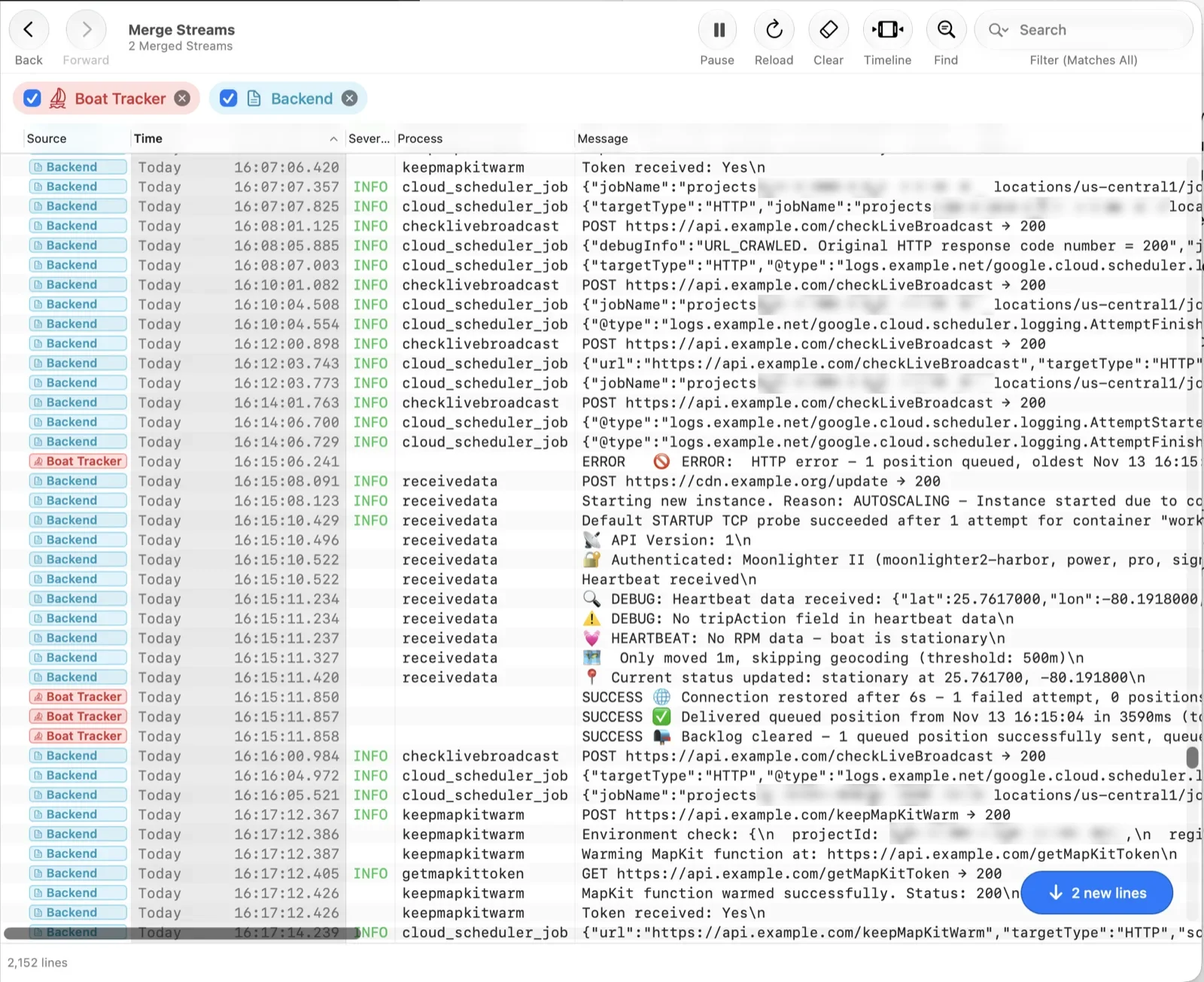
I work mostly on a Mac mini with a big Studio Display, and I wanted a native app where I could add all my devices and log files once, group and organize them, and have it watch them in real time for the things I care about. Most of all I wanted to be able to easily search and correlate: pick a moment in the Cerbo GX log on the boat, line it up with the Firebase log on the server side (and even account for the clock skew of both devices!), and step through the whole sequence of events across both.
Doing it the native way
Instead of spawning an ssh process for every device, I went the native route and used swift-nio-ssh to talk SSH directly from the app. I quickly realized that the app would be generally useful to a lot of people, so instead of a quick and easy app just for myself, I designed it for general use, and that meant making it as resource-efficient, fast, native and well-designed as possible. Collin Donnell coined a term for such apps, Brent Simmons picked it up, and John Gruber of Daring Fireball fame popularized it: “Mac-assed”.
That rabbit hole got deep enough for posts of its own: adding RSA support to swift-nio-ssh, Secure Enclave SSH keys without an agent, and where LogRaker keeps your SSH keys.
From SSH to the cloud
Of course, SSH doesn’t help with Firebase logs, so I had to add native support for Google’s Firebase. Then a good friend and former work colleague who runs big deployments on AWS these days wanted it for their EC2 instances (which is where the RSA keys came in), and over time LogRaker grew support for Amazon CloudWatch, Amazon S3 and Supabase too, and continues to grow.
Today LogRaker tails logs over SSH, from local files and from the cloud, merges Streams by time (clock skew included), and its Monitors keep an eye out for the things I care about.
So, if you’re dealing with log files spread out over multiple systems, check out LogRaker; it will likely make your life a lot easier! It certainly made mine.
Thanks for reading!
