Full circle…
If you read why I created LogRaker, you know it all started with a wall of Terminal windows, each one tailing some log file on the Cerbo GX or the Jetson. LogRaker replaced that wall a while ago, and now, funnily enough, version 3.0 comes with a terminal of its own.
Spot it in the log, and then what?
Watching logs is only half the job. Sooner or later a log shows me something that needs fixing, like the water tank plugin on the Cerbo GX throwing the same error over and over, and then I want a shell on that box. Until now that meant switching to Terminal.app, typing ssh root@... (or digging through my shell history for it), logging in, and then flipping back and forth between two apps to compare what the log said with what the shell told me. Not the end of the world, but by the tenth time in one evening it got old.
And the silly part was that LogRaker already had an SSH connection open to that very box, for its Streams, with the key and the trusted host fingerprint and everything. So why not open a shell on it right there?
A drawer under the logs
So that’s what the Terminal is. Right-click an SSH Source in the sidebar and select ‘Open Terminal’ (or right-click one of its Streams, a pane’s header in a Layout, or even a single log line, and select ‘Open Terminal on’ that Source), and a drawer opens under the logs with the prompt waiting for you. It rides on the same SSH connection the Streams already use, so there’s no second login, and no second trust prompt either.
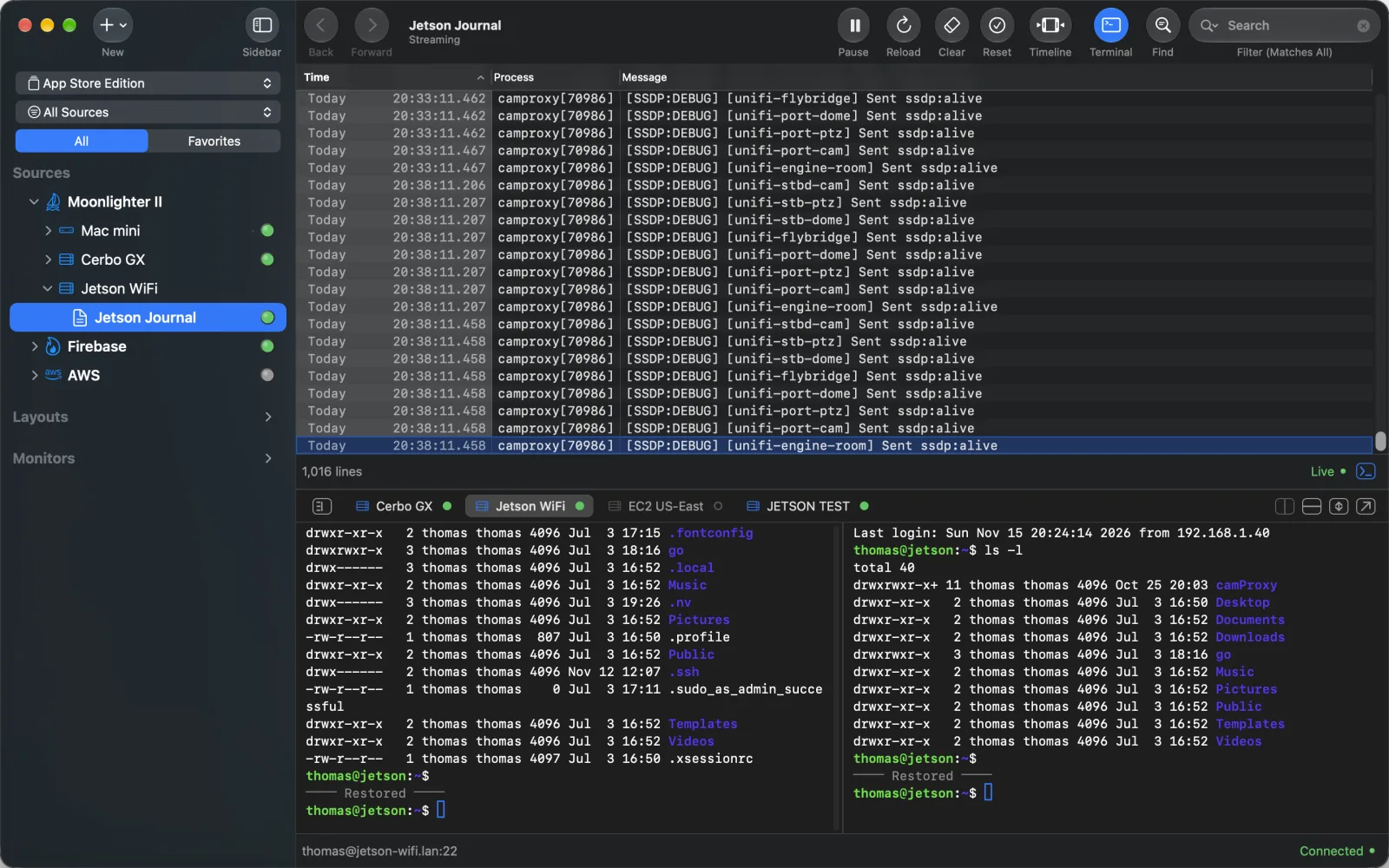
Every SSH Source in the Workspace gets a tab with a little light, yellow while connecting, green once the prompt is up and red when something went wrong. Click a tab and you’re on that server. When I click into a pane showing a Jetson log, the drawer switches to the Jetson’s tab by itself (it only ever switches, it never opens a shell you didn’t ask for).
The shells keep running when you hide the drawer, switch to another Layout or close a pane, so whatever you had going is still there when you come back. A shell only ends when you click the ✕ on its tab (or type exit, of course).
Two shells, a second display, the whole window
Quite often I want one shell running top and another one to poke around in, so a tab can split into two shells on the same server, side by side or stacked, both on that one connection.
If you have a second display, press ‘Detach’ and the terminal moves, tabs and all, into a window of its own, and the logs keep the first screen. And when I need room for vim, ‘Maximize Terminal’ folds the logs away and gives the terminal the whole window, and ‘Restore Terminal’ puts everything back where it was.
Of course there’s also ‘Find’, the same find bar the Streams have, token pills and all, and it searches everything the terminal holds, scrollback included.
It remembers where you left off
When you quit LogRaker and come back, the terminals reconnect on their own and show what was on screen before, under a faint “Restored” line. The shell itself is a fresh one (anything you left running ended when LogRaker quit), but your command history is still there, so the up arrow takes you right back to whatever you ran last night.
Letting an agent lend a hand (only if you want)
LogRaker has an MCP Server, so AI agents can already read your Streams, and with 3.0 they can read your terminals and type into them too. That’s a lot of trust to hand out, since a terminal’s scrollback can hold tokens and keys, and typing into a shell runs commands… so I was careful here. ‘Read Terminals’ and ‘Type in Terminals’ both start switched off, turning either one on asks for Touch ID (or your login password), and an agent can only use terminals you already have open. It can’t open one itself.
When an agent types something, a faint line with its name and the time shows up above what it typed, so later on you can tell your own commands from the agent’s. And if you’re looking at another tab at that moment, the agent’s tab gets a little sparkle and pulses in your accent color for a bit, so you don’t miss it.
Under the hood
The terminal emulation is SwiftTerm by Miguel de Icaza, a native Swift terminal emulator, and a really nice one. The SSH side is the same swift-nio-ssh connection pool that has been feeding the Streams all along, so a new shell is just one more channel on a connection that’s already open.
Give it a spin
The Terminal works on any SSH Source in LogRaker 3.0, and like Streams it needs an active trial or a license. All the details are in the Terminal docs.
So, if you keep a Terminal.app window open next to your logs all day, give LogRaker a try. I spot something in the Cerbo GX log now, fix it right underneath, and watch the log tell me whether it worked.
Thanks for reading!
